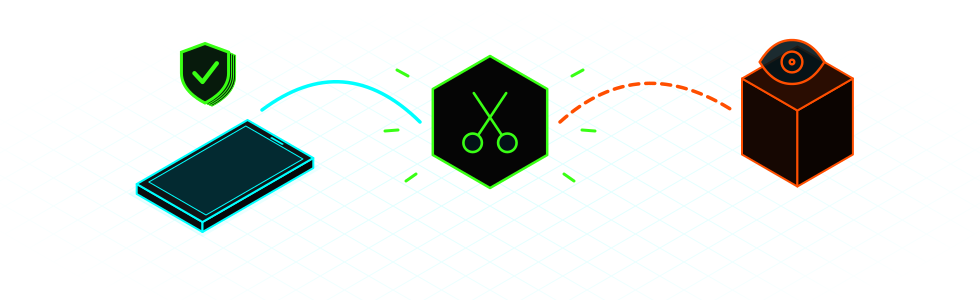
What's going on? Start here
 I got an alert from Apple, Google or WhatsAppDon't delete anything. Go and get help.
 My calls are acting strange or my line has gone deadFive minutes. Dial a few codes and make one call.
 Someone knows what I write on WhatsApp or in my emailCheck your open sessions. It's the quickest thing to do.
 I think I'm being spied on, or someone put something on my phone or computerFifteen minutes. Checks for iPhone, Android and computers.
 I'm going to a strike or a protestWhat to do with your phone before, during and after.
 I'm here to set up the labZero Breach Toolkit, MVT and PiRogue.
Before you touch anything
You'd lose the evidence.
One you trust, to look for help and change passwords.
With dates and screenshots. If it's serious, let someone you trust know.
Where the snooping actually happens

What exactly is each one?There are five different cases, and one can't be seen from the phone.
| What it is | Can you see it? |
|---|---|
| Call forwarding or SIM swap. Your calls or texts go somewhere else. | Yes. Step 1. |
| Account open somewhere else. WhatsApp Web, Telegram or Google on a device that isn't yours. This is one of the most common cases. | Yes. Step 2. |
| Spy app (stalkerware). Someone had your phone in their hands and installed something on it. | Often, yes. Step 2. |
| Paid spyware (Pegasus, Predator, Graphite). Aimed at journalists, activists and specific people. It can get in without you touching anything. | Not by eye. It takes a lab, and even then it may not show up. Step 3. |
| Court-ordered wiretap. The carrier does it on a court's orders. | No. It leaves no trace on the phone and stays secret while it lasts. Once it ends, you have a right to know. |
Calls and your carrier
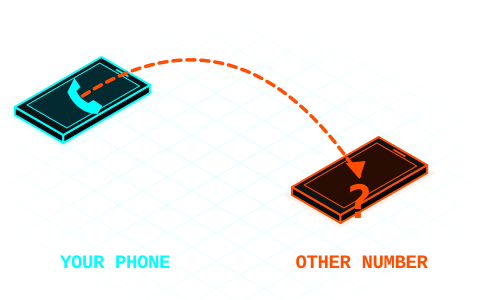
You're going to dial a few codes and make one call.
ACheck for call forwarding
Open the Phone app, dial the code as if it were a number and press call. Take a photo or screenshot of the result before you change anything.

| Dial | Tells you if calls are being forwarded… |
|---|---|
*#21# | all of them, always. This is the one that matters most. |
*#61# | when you don't answer. |
*#62# | when you have no signal or your phone is off. |
*#67# | when you're on another call. |
BHow to read the result
There's no forwarding. That's all it means: it says nothing about spy apps or wiretaps.
That's usually your voicemail. Confirm it with your carrier.
That doesn't mean anything bad: some codes don't work with calling over 4G (VoLTE). Check your carrier's app or ask them by phone.
That shouldn't be there. Take a photo, remove the forwarding and call your carrier.
CRemove any forwarding you don't want
##21#,##61#,##62#,##67#each remove their own.##002#removes them all at once. Careful: that includes voicemail forwarding, so if you use voicemail you may have to turn it back on.
You can also see this in your settings. iPhone: Settings > Apps > Phone > Call Forwarding (on older iOS, Settings > Phone). Android: the Phone app, its settings and Call forwarding; the name varies by brand.
The *#06# hoax. Word goes around that if you dial *#06# and nothing comes up, you're tapped. That code only shows your IMEI, the phone's serial number. It detects nothing.
DCall your carrier

| Carrier | Phone | Hours |
|---|---|---|
| Movistar | 1004 | Every day, 9:00 to 22:00 |
| Vodafone | 22123 | 24 hours |
| Orange | 1470 | Monday to Saturday, 9:00 to 22:00 |
| Yoigo | 622 622 622 622 from another carrier | 24 hours |
| O2 | 1551 | Every day, 9:00 to 22:00 |
| Digi | 1200 | Every day, 7:00 to 24:00 |
Different carrier, or a number that doesn't answer: look on your bill or their website. If you don't trust your line, call from another phone.
Ask exactly this
- Is there any active call forwarding on my line? To what number?
- Has a duplicate SIM or a switch to eSIM been issued recently? When and where?
- Are there other lines in my name, or any requested number transfer or change of account holder?
- What protections do you have against SIM swaps? I want them turned on.
While you're at it, change your voicemail PIN if it's still the factory one.
Move fast. If your phone suddenly loses signal and you start getting notices about changes to your accounts, it could be a SIM swap. Call your carrier right away from another phone, and change your email and bank passwords from a device you trust.
And if it's a court-ordered wiretap

- Diversion codes won't show it either. They show your line's normal diversions. An interception doesn't divert the call: the network makes a copy, and the technical standard (3GPP TS 33.106) requires that it neither alters your services nor gives any sign.
- They won't tell you if you call. The carrier is legally bound to secrecy and can be charged with disobedience if it breaks it (LECrim, art. 588 ter e). A "we don't see anything odd" doesn't rule one out.
- While it lasts, it's secret: it's handled in a separate, secret case file (art. 588 bis d).
- Once it ends, you do have a right to know. Parties to the case get a copy of the recordings and transcripts. And the court must notify the people who appear in the intercepted communications, unless that's impossible, requires disproportionate effort or would harm future investigations (art. 588 ter i).
- If you think there's an open case against you, the person who can ask is your lawyer, at the court.
- Data held by the police: you can request it, but they can refuse so as not to harm an investigation. In that case you can exercise the right through the AEPD (LO 7/2021, arts. 24 and 25).
Your line data, in writing
What you can ask your carrier for is your own data, using the right of access in the RGPD (GDPR), art. 15. They have one month to reply, and the AEPD has a form.
Next: step 2, check your phone and your computer ↓Check your phone, your computer and your accounts
You're going to look at what's open and what's installed.
If you have strong reason to suspect something (you got a spyware alert, or you're a journalist or activist and something specific has happened): don't restore, update or delete anything, and if you can, ask before restarting. Jump to step 3, because any of that can destroy evidence. Looking through the menus is fine.
AThe signs, without the paranoia
| What you notice | What it usually is |
|---|---|
| Battery drains fast, phone runs hot, uses a lot of data | An old battery or an ordinary app. It could be a spy app, but this alone proves nothing. Check which app is using power in your battery settings. |
| Noise or echo on calls | Bad signal. A modern wiretap makes no sound. |
| Verification codes you didn't request | Someone is trying to get into that account. Change the password and turn on two-step verification. |
| Odd message with a link, even if it's from your bank or "a friend" | Phishing. Don't open it. If you already did, save it and keep reading. |
| Someone knows things you've only said on your phone | Check your open sessions first. If there's nothing there, go to step 3. |
| Official alert from Apple, Google or WhatsApp about spyware attacks | This one is serious: it means someone tried, not that you're infected. Only an analysis can confirm it. Step 3. |
Expensive spyware gives no signs. A phone working fine doesn't rule it out, and a phone working badly doesn't confirm it.
BStart with your accounts

It's the quickest check and the one that finds the problem most often. Look through the devices listed and close anything you don't recognize:
- WhatsApp: Settings > Linked devices. Also turn on Settings > Account > Two-step verification.
- Signal: Settings > Linked devices.
- Telegram: Settings > Devices.
- Google: myaccount.google.com/device-activity.
- Email: look in the settings for forwarding rules or filters you didn't set up.
Then change your passwords from a device you trust, not the one you suspect.

Myths and false alarmsIncluding the "trick" of turning your phone off for five minutes.
"Turning your phone off for five minutes a day protects it." Pedro Sánchez talked about it in October. There's some truth to it: a lot of commercial spyware doesn't survive a reboot, so restarting often helps. But it doesn't fix the flaw it got in through, and they can get back in.
"Battery, heat or clicks = tapped." On their own they prove nothing.
"An app says I'm clean, so I am." It only means it didn't find what's already known. It gives false security.
"Apple alert = infected." It indicates an attempt. Confirmation comes from a forensic analysis.
"The first thing to do is wipe it." That destroys the evidence. Get help first.
"On Signal nobody can read me." The encryption works, but if you're tricked into linking another device with a QR code, that device gets your new messages. Don't scan a QR code to "verify" anything unless you started the linking yourself.
"In airplane mode I'm invisible." Only turning it off gives you that guarantee.
"I have nothing to hide." Surveillance also affects the people you talk to: sources, comrades, family.
CPick your device and tap to open the steps
 iPhone7 steps
- See if Apple has warned you. Threat notifications show up on the lock screen and in Settings, in an email from
threat-notifications@email.apple.comand in a notice at the very top of account.apple.com. In these, Apple never asks you to tap links, install anything or give passwords or codes. If it asks, it's fake. If it's real, go to step 3. - Safety Check: Settings > Privacy & Security > Safety Check > Manage Sharing & Access. It shows who can see your location and your stuff, and which devices are on your account. "Emergency Reset" cuts off all access at once.
- Profiles: Settings > General > VPN & Device Management. If nothing appears, you don't have any installed, which is normal on a personal phone. If there's a profile you don't recognize, take a photo and ask before deleting it. If the phone belongs to your employer or school, it may be theirs.
- Face ID: Settings > Face ID & Passcode. If there's an "Alternate Appearance" that isn't yours, someone else can unlock the phone. Also change your passcode if anyone knows it.
- Apps: scroll down to the App Library, type in the search box and go through the list. Look for anything you don't remember installing.
- Update: Settings > General > Software Update. Unless you have strong suspicions, this is one of the best things you can do.
- If you're at high risk: Settings > Privacy & Security > Lockdown Mode. It limits quite a few things on the phone, but it's the strongest defense it has against paid spyware.
 Android7 steps
Menus vary by brand. If you can't find something, use the search bar at the top of Settings.
- Play Protect: in the Play Store, your profile icon > Play Protect > Settings. Check that it's still on and run a scan. If it's off and you didn't turn it off, that's a bad sign.
- Accessibility: Settings > Accessibility, in the installed or downloaded apps section. This permission lets an app read your screen and is the favorite of spy apps. If there's one you don't know, be careful.
- Admins: in Settings > Security, search for "device admin apps". On a personal phone you should only see things from Google or the manufacturer.
- Special permissions: in Settings > Apps > Special app access, check "Notification access" and "Install unknown apps".
- Apps: in Settings > Apps, show all of them, including system apps. Be wary of blank or generic names like "Sync", "Service" or "System", with no icon and with microphone, location or SMS permissions. If in doubt, look it up from another device.
- USB debugging: if it's on in Developer options and you didn't turn it on, that's a sign.
- If you're at high risk: in Settings > Security & privacy > Other settings > Advanced Protection, if your phone has it (Android 16 or later).
 Computer5 steps
- Remote control: look through your programs for TeamViewer, AnyDesk or similar that you didn't install. They're normal programs, but they let someone operate your computer from outside. Windows: Settings > Apps > Installed apps. Mac: Applications folder.
- What starts by itself: Windows: Task Manager > Startup apps. Mac: System Settings > General, under Login Items. Look for anything you don't recognize.
- Remote management on Mac: System Settings > General > Device Management. If the Mac is personal, nothing should appear.
- Scan: on Windows, Windows Security > Virus & threat protection and run a full scan. Check your browser extensions for any you didn't add.
- Update your system and browser, unless you have strong suspicions.
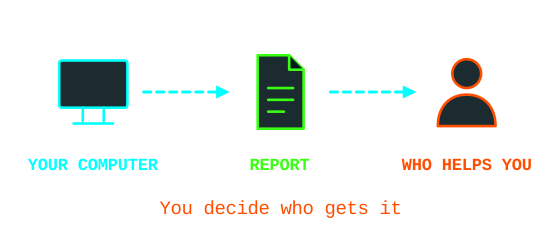
If you want to go a step further, Zero Breach Toolkit looks for traces of known spyware on your computer and uploads nothing to the internet. It only looks at that computer: it won't tell you if your phone is infected.
DWhat to do with what you found
That doesn't guarantee you're clean. If you have no reason to think someone is after you, keep things updated and use different passwords and two-step verification.
Take dated screenshots and close whatever belongs to you. If it's still not clear, go to step 3.
Stop there. Don't delete or restore anything, and get help.
EMake it harder next time
10-minute routineDo it every so often.

- Restart your phone.
- Install pending updates, for the system and your apps.
- Go through your linked devices on WhatsApp, Signal, Telegram and Google.
- Use a long unlock code, not a pattern or four digits.
- Delete apps you no longer use.
Lock down your accountsPasswords, keys and phone theft.
- Avoid SMS as a second factor if you have another option: it's the weakest. A passkey or a code app is better.
- Physical keys if you're at risk: register two, because if you lose your only one you're locked out.
- Stolen iPhone: turn on Stolen Device Protection in Settings > Face ID & Passcode.
- Before a strike or a protest, read this part.
Get help
You can come straight here without doing any of the above.
AMeeting points
We're setting up places to check phones in person and run the lab. We'll post them here once they're confirmed.
Wherever you go:
- Bring your phone charged, its cable, your unlock code in your head and a list of what's happened, with dates.
- You have the right to see everything that's done and to say no.
- Nobody needs your passwords. You type them in yourself.
- Ask what data gets copied, where it's stored and when it's deleted.
- Be wary of anyone online offering to "clean your phone": it's a classic scam.
BHelplines
| Who | What for |
|---|---|
| Access Now, Digital Security Helpline | Activists, journalists, human rights defenders and collectives. Free, 24 hours, in Spanish as well. They do a prior check of who you are. |
| Amnesty International, Security Lab | Journalists, activists and organizations at risk from targeted attacks. |
| INCIBE: 017 | Anyone, especially for scams and stolen accounts. Free and confidential, 8:00 to 23:00. Also on WhatsApp (900 116 117) and Telegram (@INCIBE017). It's a public body: keep that in mind if your case is political. |
CGuides to follow, in Spanish
- Digital First Aid Kit: guides you based on what's happening to you.
- TeknoKasa digital self-defense guides, from Madrid: locking your phone, being arrested and more.
- Assess your risks, from the EFF: six questions to make your plan.
- Mercenary spyware, from SocialTIC.
- Data Detox Kit, from Tactical Tech.
- Self-care for people going through this, from the same kit.
How to write down what happensA template so you don't lose the evidence.

It's useful for you and for whoever helps you. Copy this onto paper or a device you trust, with one line for each odd thing:
Date and time:
Device or account:
What happened:
Number, email or link involved:
Screenshot saved (where):
Who I've told:
- Take screenshots before blocking or reporting an account: afterwards it may disappear.
- Don't open suspicious links to see what they are. Copy the text without tapping it.
- Keep an encrypted copy. If it's overwhelming, ask someone you trust to handle it.
- To file a complaint in Spain, this guide explains how to present the evidence.
Strikes and protests

- Before: back up, use a long code, and turn off Face ID or fingerprint. Agree on a meeting point in case there's no network. Consider bringing a phone with little data on it, or not bringing one at all.
- During: if you're afraid it'll be taken, turn it off. Airplane mode isn't enough. Take photos without unlocking, from the lock screen.
- After: blur faces before posting. If your phone was taken from you, even for a little while, treat it as suspect: step 2.
Based on the EFF guide, written for the US, and on TeknoKasa's. This isn't legal advice: to find out what to do if you're asked for your phone in Spain, talk to your lawyer or an anti-repression collective.
Take back the rest of your digital life
At resetea.net.



Techie zone: the lab
For hacklabs and anyone who wants to learn.
This part is for setting up the lab. You don't need it to check your phone. The commands don't fix anything on their own: a "clean" doesn't mean clean and a match doesn't mean infection.
Consent. Only on your own phone or that of someone who asks you and is right there. Analyzing someone else's without permission is a crime, and you end up doing the very thing you're trying to fight. MVT's license expressly forbids it.
How paid spyware gets in
These are the three routes documented in Amnesty International's investigations. Knowing how it gets in helps you know what to look for.
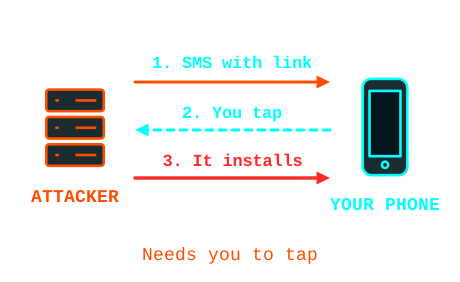
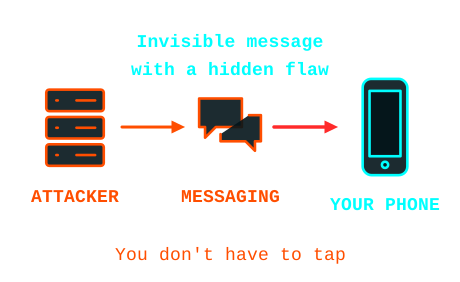
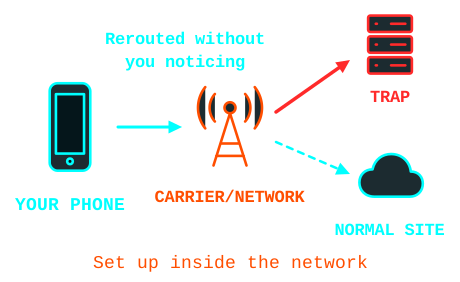
Our own diagrams, based on Forensic Methodology Report: How to catch NSO Group's Pegasus (2021) and Predator Files: Technical deep-dive (2023), by Amnesty International. Hacksito has no connection with Amnesty International.
This happens in Spain too
In October 2026 the BOE, Spain's official gazette, published that the Guardia Civil had bought a system for "remote searches" of phones for €2,066,115.70 (about €2.5 million with VAT). It can "host software" on Android and iOS for "transparent access" to content and communications.
The contract went to Fortier Europe, based in Boadilla del Monte, through a negotiated procedure without publication and with a single bid, citing the manufacturer's exclusivity.
What isn't known: who makes it, how it's installed and whether it's Pegasus. The notice doesn't say, and pinning it on a specific product today would be speculation.
The law (LECrim, art. 588 septies) requires court authorization and limits it to certain offenses, for one month, extendable up to three. Earlier, Citizen Lab documented at least 65 people in Catalan pro-independence circles targeted with Pegasus and Candiru.
What each tool is
| Tool | What it does | Who it's for |
|---|---|---|
| Zero Breach Toolkit | Looks for published spyware traces on computers, in iPhone backups and in data collected from Android. It has a graphical interface and gives results in plain language. | First filter, for low technical level. |
| MVT (Amnesty) | Forensic analysis: extracts logs and compares them against lists of indicators. | Terminal. The project itself says it isn't for self-diagnosis. |
| PiRogue (PTS) | A Raspberry Pi acts as a router and analyzes the phone's traffic. It doesn't look inside the phone: it looks at who the phone talks to. | For people who know networking. |
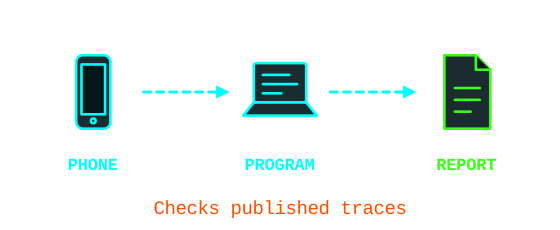
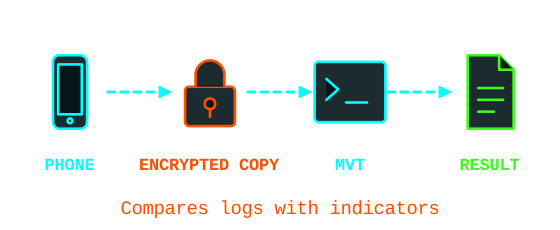
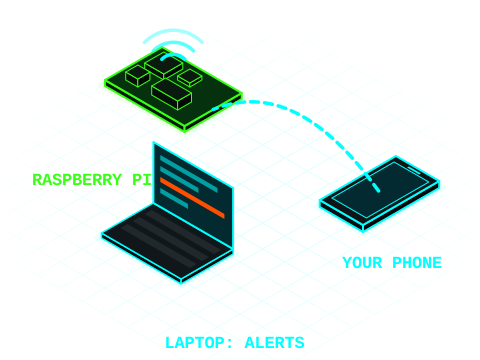
They complement each other: the first two look at what's stored on the device, and PiRogue at what it does on the network while you watch.
Fake antennas: 2G and RayhunterFor organizers of an event or action.
An IMSI catcher is a fake antenna that identifies nearby phones. Unlike spyware, it doesn't touch the phone, and whoever runs it has to be in the area.
- Turn off 2G: Android's Advanced Protection blocks it on compatible phones, and on iPhone Lockdown Mode does the same. You may lose service where only 2G is available.
- Rayhunter (EFF) looks for signs of fake antennas using a cheap mobile router. In Europe they recommend the TP-Link M7350, and it needs a SIM. An alert doesn't prove there's a fake antenna, and the capture may contain your IMSI. The EFF itself advises consulting a lawyer outside the US.
How to set up the stationThe first thing, before touching any phone.
- A trusted laptop with an encrypted disk, dedicated if possible. If the computer is compromised, everything is.
- Backups contain the person's whole life: messages, photos, history. They stay local and encrypted, and get deleted when that person decides.
- Nothing goes to the cloud or to online analysis services without their authorization.
- Update the indicators the same day. With old lists, the result is worthless.
- With a credible positive, stop touching things and pass the case to Security Lab or Access Now.
Zero Breach ToolkitFirst filter. Has a graphical interface.
Very young project. The repository was created in October 2026 and we haven't found any independent audit. Versions 2.0.0 to 2.0.2 could show green without having finished checking a phone: if you used one of those, repeat with the latest. There are repositories with similar names. Download only from interplains/Zero-Breach-Toolkit.
Installation. Download the program for your system (Windows, Mac or Linux) and open it. Since it isn't signed yet, your system and some antivirus programs will warn you. Check its origin first:
gh attestation verify <archivo> --repo interplains/Zero-Breach-Toolkit
Update the indicator lists before running the check. The analysis uploads nothing to the internet.
Computer. Close your browsers and messaging apps, choose the "Standard" check (15 or 20 minutes) and press "Start check".
iPhone. It analyzes a backup on the computer, never on the phone itself. Connect it, tap Trust and make a backup with "Encrypt local backup" checked (Finder on Mac, Apple Devices on Windows). In the program choose "A phone" and drag in the backup folder, which is here:
Mac:     ~/Library/Application Support/MobileSync/Backup
Windows: %USERPROFILE%\Apple\MobileSync\Backup
Android. Turn on Developer options (tap Build number seven times) and USB debugging. Connect with a data cable and authorize the computer. In the program, "A phone" and the option to collect from Android over USB. Keep the phone unlocked. When you're done, turn USB debugging off.
How to read it
Nothing from the public lists appears in the places it was able to read. Review the list of what it couldn't check. Spyware with no published traces won't show up.
It means "look closer", not "you're infected". Don't delete anything or visit the address it shows. Save the report and pass it to the helpline. A shared domain can produce innocent matches.
MVT (Mobile Verification Toolkit)Forensic analysis from the terminal.
It requires Python 3.11 or later and Linux or Mac. On Windows, through WSL. It has its own license that restricts use without consent, so it isn't free software in the strict sense.
sudo apt install python3 python3-venv python3-pip sqlite3 libusb-1.0-0 pipx
pipx ensurepath
pipx install mvt
mvt download-iocs
iPhone
An encrypted backup exposes more records, such as Safari history. You can make one from Finder or Apple Devices, or from the terminal:
sudo apt install usbmuxd
pipx install pymobiledevice3
pymobiledevice3 lockdown pair
pymobiledevice3 backup2 encryption on 'PASSWORD'
pymobiledevice3 backup2 backup --full ./copia/
That password stays in your shell history: delete it afterwards. Keep the phone unlocked. The backup appears in a subfolder named with the phone's UDID. To decrypt and analyze it:
read -rs MVT_IOS_BACKUP_PASSWORD; export MVT_IOS_BACKUP_PASSWORD
mvt-ios decrypt-backup -d ./descifrada ./copia/<UDID>
unset MVT_IOS_BACKUP_PASSWORD
mvt-ios check-backup --output ./salida ./descifrada
Android
MVT no longer analyzes directly over ADB. Collection is done with AndroidQF: turn on USB debugging, authorize the computer, run the binary and answer what it asks. Then:
mvt-android check-androidqf ./salida-androidqf
The --virustotal option is off by default. Leave it that way unless the person agrees to have their apps looked up on an external service. When you're done, turn USB debugging off.
How to read the result
- Matches are highlighted in the terminal and saved to the output folder. Read those results and place them on the timeline.
- With each match, ask yourself: which indicator is it, from what campaign and from when? Does the date fit the person's story? What process or domain shows up?
- A match isn't a diagnosis. Before telling anyone anything, have someone experienced review it. Accepting a false positive does a lot of damage.
- No matches doesn't mean certainty either. The documentation itself warns that public indicators aren't enough to say a phone is clean.
PiRogue Tool SuiteA Raspberry Pi that analyzes traffic.
It's a Raspberry Pi that creates a wifi network. You connect the phone to it and the Pi analyzes all the traffic live with Suricata, using ProofPoint ET Open rules and Echap's stalkerware indicators.
Hardware: Raspberry Pi 3B, 3B+ or 4 (the 5 is experimental), power supply, 32 GB microSD (64 GB for long captures) and a network cable. Better with more than 2.5 GB of RAM: below that, Suricata is disabled, and without it there are no alerts.
Installation
Download the PiRogue OS image from the official guide, check the hash and flash it with Balena Etcher. Connect the Pi by cable and log in:
sha256sum PiRogue-OS-*.img.xz
ssh pi@pirogue.local       # initial password: raspberry, change it on first login
sudo apt update
sudo apt dist-upgrade -y
sudo apt install pirogue-base -y
sudo reboot
During installation answer No to saving the IPv4 and IPv6 firewall rules, and Yes to rootless capture. Then get the wifi key and the dashboard key (in version 2.x they're random; 1.x is different, the guide explains it):
pirogue-admin-client wifi get-configuration
pirogue-admin-client dashboard get-configuration
The dashboard is at https://pirogue.local/dashboard, with a self-signed certificate. Telemetry is on by default: turn it off following the guide before connecting anyone's phone.
Capture
On the phone, turn on airplane mode, enable only wifi and disconnect any VPN, so everything goes through the PiRogue. Connect it to the PiRogue's wifi. Flows appear on the dashboard after about 4 minutes. Leave it running for several days with normal use: spyware doesn't always communicate the moment you look. The dashboard keeps 5 days.
To capture to a file and open it later in Wireshark:
sudo tcpdump -i wlan0 -w $(date +%Y%m%d%H%M)_captura.pcap
scp pi@pirogue.local:~/*_captura.pcap .
How to read the result
- Security alerts: look at the time, severity, threat type, rule name and source and destination IPs. Many are noise, like ads or trackers. Read the rule before drawing conclusions.
- Flow list and map: look for odd domains, large data transfers at dead hours or regular connections while the phone is idle. Check who owns each destination. Most will be Apple, Google and the usual apps.
- Limits: nearly everything is encrypted, so you see who it connects to and how much, not the content. Suricata only detects what's already known. No alerts guarantees nothing.
- Privacy: the capture is a portrait of the person's life. Treat it like any other backup: local, encrypted and deleted when you're done.
The project itself recommends that, in risky situations, the analysis be followed up by professionals. PTS guides
Get off proprietary software
When you're done here, the next step.
 OPSECPhones without Google, free operating systems, browsers, messaging and services.
Sources
Reviewed in November 2026. Menus and phone numbers change: if something doesn't match, trust the official source.
- Amnesty International: Pegasus forensic methodology and Predator Files
- BOE-B-2026-33966: Guardia Civil contract
- Digital First Aid Kit, EFF: Surveillance Self-Defense, Coalition Against Stalkerware and Tactical Tech: Holistic Security
- Apple: threat notifications, Lockdown Mode and Safety Check
- Google: Play Protect and Advanced Protection
- Vodafone: call forwarding and O2: contact
- Selectra: call forwarding codes 2026
- Zero Breach Toolkit, MVT, AndroidQF and PiRogue Tool Suite